Subtitle guide · checked against the publishers' own rules
Subtitle guidelines: the rules behind readable captions
Professional subtitle guidelines agree on the basics: keep each subtitle to one or two lines, keep lines short, and leave each one on screen long enough to read. The exact numbers differ by publisher. This guide compares Netflix, the BBC and the DCMP Captioning Key, then shows how to apply them to short vertical video.
Open the subtitle editorSubtitle guidelines at a glance
The table lists each publisher's own figures. Where a guideline does not set a number, the cell says so instead of filling the gap.
| Rule | Netflix (English, USA) | BBC Subtitle Guidelines | DCMP Captioning Key |
|---|---|---|---|
| Characters per line | 42 | 37 for landscape video; about 25 for vertical 9:16 video | No fixed number |
| Lines per subtitle | 2 at most | 2 for 16:9, 4:3 and 1:1; up to 3 for 9:16 | 2 preferred; 3–4 occasionally acceptable |
| Reading speed | Up to 20 characters per second for adult programs; 17 for children's programs | About 160–180 words per minute | 130, 140 or 160 words per minute, depending on the audience's educational level |
| Shortest subtitle | 5/6 of a second (20 frames at 24 fps) | About 0.3 seconds per word | 40 frames (1 second and 10 frames) |
| Longest subtitle | 7 seconds | No single figure | 6 seconds |
| Placement | Centered, at the top or bottom of the screen | Not compared here | Bottom of the screen; move to the top when it covers important visuals |
Sources checked on October 6, 2026. Publishers update their guidelines; follow the current version for formal delivery.
Characters per line
Short lines are faster to read because the eye travels less. Netflix allows 42 characters per line for English. The BBC's limit of 37 characters comes from the width of a Teletext line, and it translates the same width into about 25 characters for vertical 9:16 video. DCMP does not fix a character count and instead asks that captions sit within reasonable margins so no letters are cut off.
If you only remember one rule, keep each line short enough to read in a single glance, and shorter still on a phone held upright.
The typeface changes how much fits, so compare readable subtitle fonts before you settle on a length.
How many lines a subtitle should have
Two lines is the common ceiling for landscape video. Netflix sets two as the maximum and prefers a single line when the text fits. The BBC recommends two lines for landscape and square video and up to three for vertical video, where lines are narrower. DCMP prefers two lines and accepts three or four only occasionally.
Reading speed
Reading speed decides how much text a subtitle can hold for the time it stays up. Netflix measures it in characters per second: up to 20 for adult programs and 17 for children's programs. The BBC and DCMP measure words per minute: the BBC works to about 160–180 for most programs, and DCMP sets ceilings of 130, 140 and 160 by educational level. When speech is faster than these rates, subtitlers condense the wording instead of letting text flash past.
How long a subtitle should stay on screen
A subtitle needs enough time to be read and should not linger after the speech has moved on. Netflix sets a minimum of 5/6 of a second and a maximum of 7 seconds. DCMP uses a minimum of 40 frames, which is 1 second and 10 frames, and a maximum of 6 seconds. The BBC ties the minimum to the words: about 0.3 seconds for each word on screen.
Where to break a line
Where a line breaks affects how easily it reads. Netflix asks for breaks after punctuation and before conjunctions or prepositions. It also asks you not to separate words that belong together, such as an article and its noun, an adjective and its noun, a first and last name, or a verb and its subject pronoun. A line that splits a phrase in the middle makes the viewer hold half a thought in their head.
Placement and safe areas
Most guidelines put subtitles at the bottom of the frame and move them to the top when they would cover on-screen text or something important. Netflix centers subtitles at the top or bottom of the screen. DCMP places captions at the bottom and left-aligns them when possible. On social video, the platform's own buttons and captions also cover part of the frame, so keep text inside the area they leave clear. See how this works for TikTok.
What accessible captions must include
Accessibility rules ask for more than dialogue. Under WCAG 2.2 success criterion 1.2.2, at Level A, prerecorded audio in synchronized media needs captions. W3C's guidance explains that captions should also identify who is speaking and include meaningful sounds, such as music or a door slam, that a viewer would otherwise miss. Subtitles that only translate or transcribe dialogue do not meet that bar on their own. Read how closed captions and open captions differ.
Applying the guidelines to short vertical video
Broadcast guidelines were written for television, but the reasons behind them still apply on a phone: short lines, a sensible number of lines and enough time to read. The BBC's vertical-video advice of about 25 characters per line and up to three lines is a useful starting point for Shorts, Reels and TikTok.
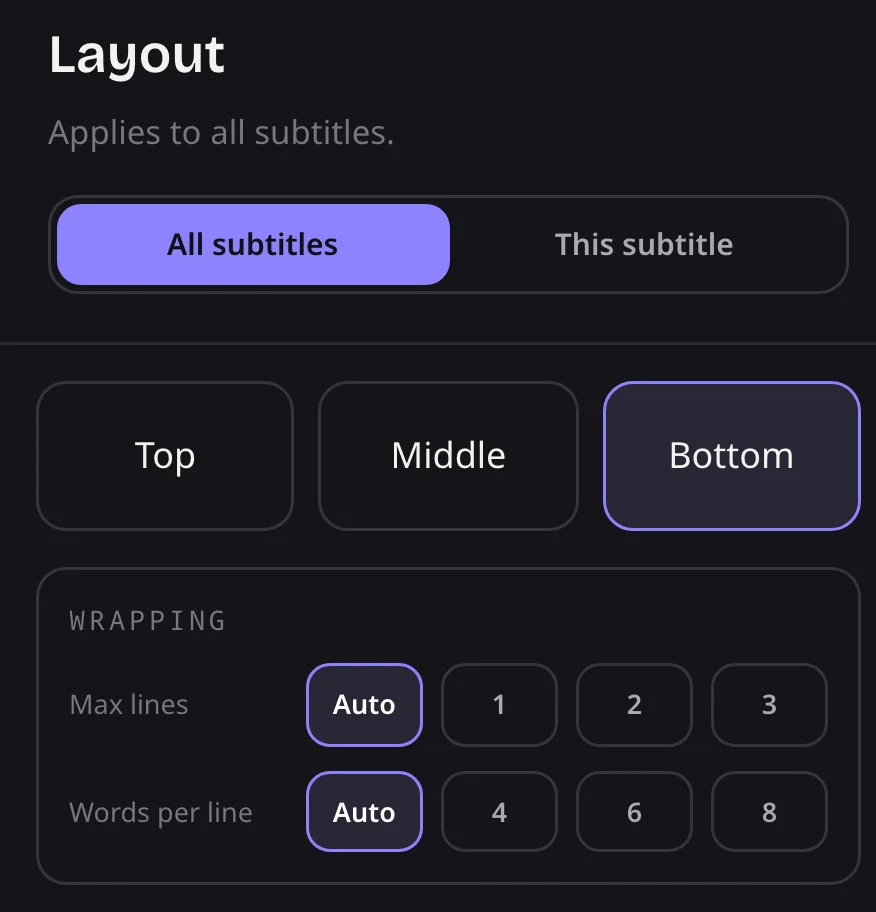
SubtitleGenerator's defaults lean the same way. When it builds captions from your speech, it ends a subtitle at the end of a sentence, at nine words, or once the subtitle reaches 3.2 seconds, and it also starts a new one when the identified speaker changes. In the editor, you can cap captions at 1, 2 or 3 lines under Wrapping. With Auto, captions follow the selected style's wrapping rules, including any built-in line limit.
Starting from your own video? Generate a timed track with auto subtitles, then apply these limits in the editor.
A quick subtitle checklist
- Keep each line short: about 37–42 characters on landscape video and fewer on vertical video.
- Use one or two lines for landscape video, and no more than three on vertical video.
- Leave each subtitle up long enough to read, and shorten the wording when speech is fast.
- Break lines between phrases, not inside them.
- Keep text clear of on-screen titles and platform buttons.
- For accessibility, name speakers and include important sounds.
Questions about subtitle guidelines
How many characters per line should subtitles have?
Netflix allows 42 characters per line for English, and the BBC uses 37 for landscape video. For vertical video, the BBC suggests about 25 characters per line. Shorter lines are easier to read on small screens.
What reading speed does Netflix use for subtitles?
Netflix's English style guide allows up to 20 characters per second for adult programs and up to 17 for children's programs.
How long should a subtitle stay on screen?
Netflix uses a minimum of 5/6 of a second and a maximum of 7 seconds. DCMP uses a minimum of 1 second and 10 frames and a maximum of 6 seconds.
Are subtitles and closed captions the same thing?
Not quite. Subtitles usually carry the dialogue, often in another language. Closed captions are meant for viewers who cannot hear the audio, so they also identify speakers and describe important sounds.
Sources
Each figure on this page comes from the publisher's own guideline, checked on October 6, 2026:
Check your captions against these rules
Generate subtitles from your video, then adjust line length, line count and timing in the browser editor before you export.