SubtitleGenerator editorial
Closed captions vs subtitles: which does your audience need?
Compare closed captions vs subtitles by audience, dialogue, sounds and language. See examples, where SDH fits, and how to choose the right video text track.
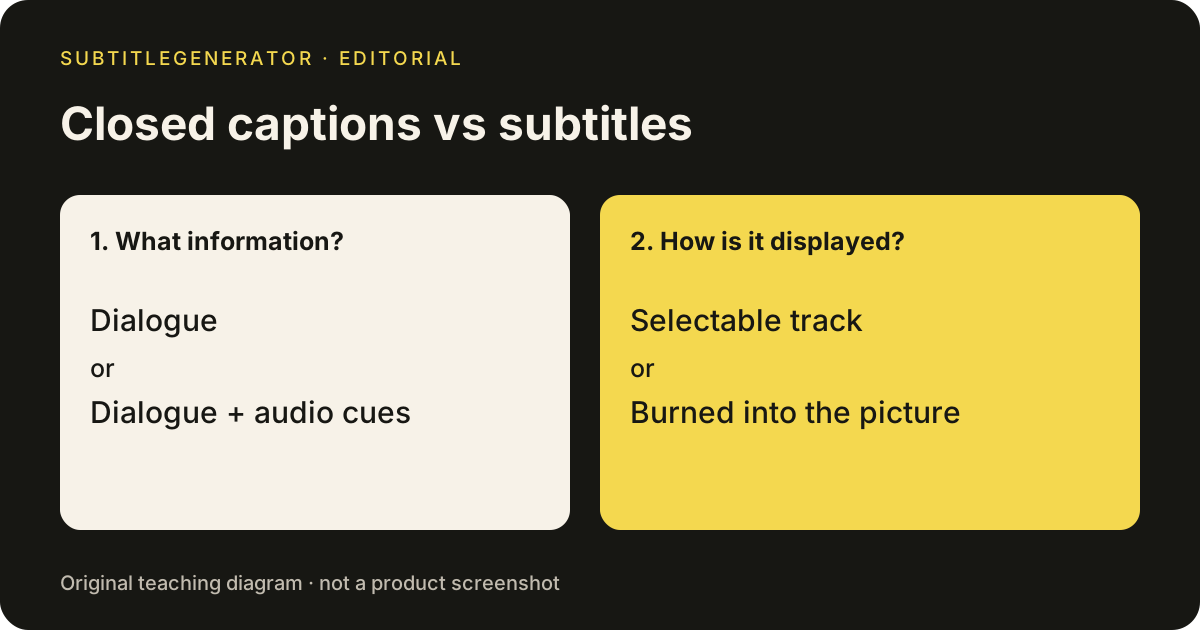
Closed captions vs subtitles is mainly a question about what viewers need from the text. Closed captions generally carry speech plus meaningful sound and speaker information. Dialogue-only subtitles help viewers follow speech, often in another language. But the labels overlap: SDH subtitles include audio details, and terminology varies by region. Choose the information your audience needs, then choose how the player will display it.
Closed captions vs subtitles at a glance
Use this closed captions vs subtitles comparison to plan the deliverable, not to judge quality from a menu label. Two files can use the same extension and still provide very different experiences.
| Question | Closed captions | Dialogue-only subtitles |
|---|---|---|
| What does the text explain? | Speech and meaningful audio information | Spoken dialogue |
| Who is it especially useful for? | Viewers who cannot hear the soundtrack | Viewers who need help understanding speech |
| Are speaker labels and sounds included? | When needed to understand the content | Often omitted |
| Must it be translated? | No | No; same-language text is also possible |
| Can viewers switch it off? | Yes, in a compatible player | Yes if it is a selectable track |
| Does an SRT extension prove the contents? | No | No |
The W3C explanation of captions and subtitles explicitly recognizes regional differences in terminology. In a production brief, write down whether you need dialogue, speaker identification and sound information. That is more precise than asking for “English subtitles” and hoping everyone means the same thing.
Closed captions and subtitles in the same scene
Consider an original teaching example: an interview cuts away to an empty hallway. A person says, “Wait there.” Then an alarm starts, and the interviewee walks out of frame.
A dialogue-only version might show “Wait there.” Closed captions might identify the unseen speaker and add [alarm sounding] when the alarm begins. The closed captions version explains why the interviewee reacts even when the viewer cannot hear the event. The editor preparing closed captions still has to decide how to describe the sound and where to place the cue.
Now imagine translating the dialogue into another language. Translating “Wait there” does not automatically supply the alarm cue. The language task and the audio-information task remain separate. Closed captions can also be translated, but translated closed captions need review for both meaning and timing.
This is why closed captions vs subtitles is a useful planning distinction even though the terms are not universal. Ask a reviewer to watch the scene without sound: can they understand what prompted the reaction? Then ask a speaker of the target language whether the translation preserves the intended meaning.
Closed captions vs subtitles is separate from open vs closed
There are two decisions. First, decide what belongs in the text. Second, decide whether viewers should be able to hide it.
Closed captions use a selectable track. Open captions are part of the picture and remain visible. Dialogue-only subtitles can also be either selectable or burned in. A translation is not automatically permanent, and a CC button does not tell you whether the words have been reviewed.
Keep the detailed platform and editing trade-offs on the closed captions vs open captions comparison. For the basic synchronized-track mechanism, see what closed captioning means. Here, the closed captions vs subtitles question is which information the viewer needs before you package it for delivery.
A useful handoff might say: “English, reviewed dialogue plus meaningful audio cues, delivered as a selectable SRT track.” That brief is harder to misunderstand than either “subtitles” or “closed captions” alone. Add the exact video version so timing is checked against the intended cut.
Where SDH fits in captions vs subtitles
SDH means subtitles for the deaf and hard of hearing. It is a reminder that the word “subtitles” does not always mean dialogue only. An SDH track includes relevant speaker and sound information, and it can use the same language as the soundtrack or a translated language.
For a viewer comparing closed captions and an SDH option, inspect the available tracks. Do the closed captions and SDH both identify an offscreen speaker? Does either omit a sound that explains the scene? Which one has readable timing? The label is useful, but the text inside closed captions determines what information reaches you.
For creators, the SDH subtitles article provides an example and a review checklist. Keep those detailed editing conventions in that workflow; the closed captions vs subtitles decision here is about choosing the right coverage for the audience.
Choosing closed captions or subtitles for your video
Start from the person watching and the destination where the video will play.
- An interview with offscreen voices: Plan closed captions with consistent speaker identification and relevant audio events. Dialogue alone may hide who is responding.
- A translation for viewers who can hear: A dialogue-focused language track may meet their immediate need. Confirm whether translated closed captions are also required by the audience or destination.
- An instructional video watched without sound: Check whether alerts, demonstrations or reactions depend on audio. Closed captions should preserve the meaning of those moments.
- A short clip with permanently visible text: Choose the text coverage first, then render it into the picture. Burning it in does not improve its completeness.
Avoid promises that closed captions alone make every video accessible or satisfy every delivery requirement. For closed captions, text accuracy, reading time, player behavior and other audience needs still matter. This comparison helps define the work; it cannot certify a finished video from its filename.
Preparing closed captions and subtitles from a reviewed draft
Use SubtitleGenerator to generate and review timed speech from a local video. The original video stays in your browser; extracted audio is processed for transcription. Correct the words and timing before choosing closed captions or a dialogue-focused output. Inspect ambiguous voices and add missing sound information where the project requires it.
For translated subtitles, the existing video subtitle translator is a Pro/Max editor capability. Review the translated text against the video. Translation does not turn unreviewed speech recognition into complete closed captions, and it does not replace a sound-information pass.
SRT and VTT downloads require Pro or Max. Free exports a 720p video with a small watermark. The same reviewed text can be delivered as a file for a compatible player or rendered into a video, within the plan's export limits. For how timing and text are stored, read what is an SRT file.
Before publishing, load the closed captions or dialogue-only output at its destination. Check a dialogue passage, an offscreen speaker and a meaningful sound. Confirm that the closed captions language and selected track are the intended ones. To inspect the editing workflow first, open the built-in sample.
Frequently asked questions
What is the difference between closed captions and subtitles?
Closed captions usually include dialogue plus meaningful sound and speaker information in a track viewers can switch on or off. Dialogue-only subtitles usually help viewers understand speech. Terminology varies by region, and SDH subtitles can also contain non-speech audio information.
Are closed captions vs subtitles a choice between two file formats?
No. Closed captions and subtitles can both use timed-text files such as SRT or VTT. Check what the text includes, which language it uses and what the receiving player supports. The extension alone does not settle the choice.
Can subtitles be in the same language as the audio?
Yes. Subtitles can be same-language dialogue or a translation. Some regions also use subtitles as the general term for accessible captions. Inspect the track instead of assuming its contents from the label.
Can you turn off subtitles as well as closed captions?
Yes, if they are delivered as a selectable track in a compatible player. Text burned into the video cannot be switched off. Viewer control is the open-versus-closed delivery question, separate from which information the text contains.
Should I use closed captions or subtitles for a translated video?
Decide what the translated audience needs. Dialogue translation can help with language comprehension, while viewers who cannot hear also need relevant sound and speaker information. Review that information explicitly; translating a speech draft does not establish a finished accessible track.
Put the workflow on a video
Inspect a local file or open the built-in sample to preview caption styles and export formats. Your video stays on your device.
Upload your video