SubtitleGenerator editorial
Closed captions vs open captions
Closed captions can be turned off; open captions can't. Learn when each wins and how to export both formats from one corrected draft.
When someone asks about the closed caption vs open caption difference, the answer comes down to control: closed captions live in a separate file and can be turned on or off by the viewer; open captions are burned into the video and are always visible. Choose closed captions for accessibility, compliance and easy editing. Choose open captions for muted autoplay, feed-first platforms and a deliberate visual style.
Closed captions vs open captions at a glance
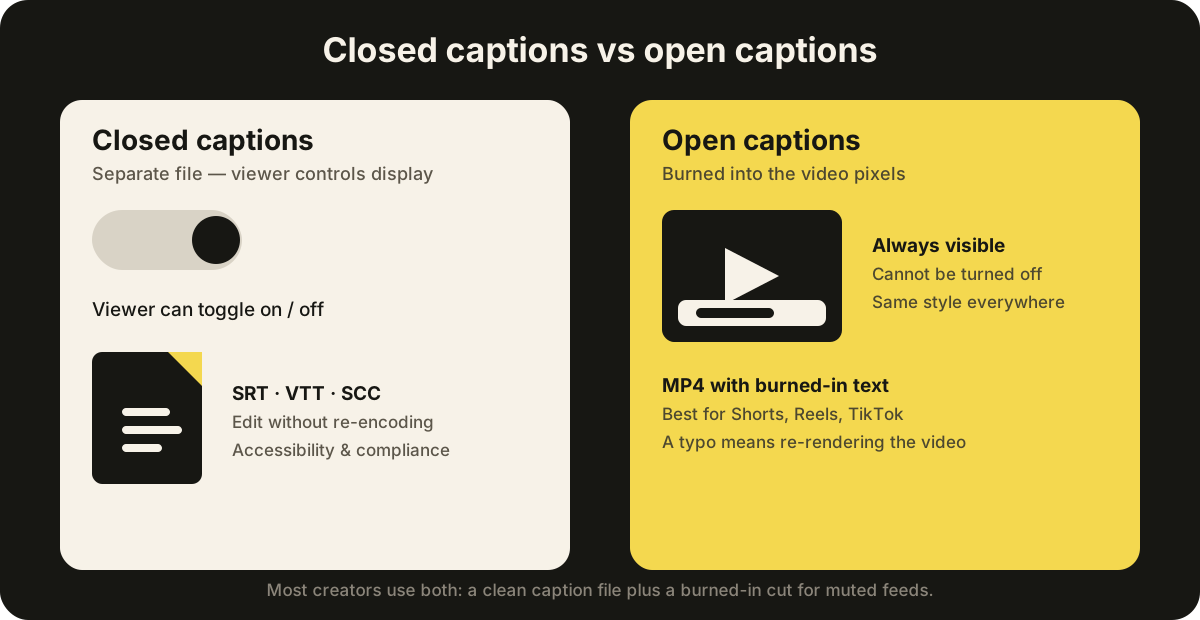
| Closed captions | Open captions | |
|---|---|---|
| Can viewers turn them off? | Yes | No |
| Where the text lives | A separate file (SRT, VTT, SCC) or a 608/708 track | Burned into the video pixels |
| Can text be revised without re-encoding? | Usually yes | No |
| Typical outputs | SRT, VTT, SCC, ASS | MP4 with burned-in text |
| Best for | YouTube, courses, broadcast, compliance | Shorts, Reels, TikTok, muted autoplay |
| Watch out for | Platform-dependent appearance | Cannot be disabled, translated or updated cheaply |
What are closed captions?
Closed captions are separate from the video image. The player loads a subtitle file such as SRT or VTT, or an embedded 608/708 caption track, and lets the viewer turn captions on or off. On YouTube you upload the file once and the platform handles the rest. In broadcast, 608/708 tracks are the standard.
For the definition before the format comparison, read what closed captioning means, including the dialogue, speaker and sound information a useful caption track contains.
That separation is what makes closed captions the safer default:
- Viewer control. Anyone who needs larger text, a different color or no captions at all can adjust or disable them.
- Editing without re-encoding. Fix a typo, update a name or translate the dialogue, re-export the file, and the video stays untouched.
- Accessibility and compliance. Toggleable captions are what accessibility guidelines and regulations such as the FCC rules expect for most video.
The trade-off is appearance: the platform decides much of the final look, so the same SRT can render differently on YouTube, LinkedIn and a learning system.
What are open captions?
Open captions are rendered into the video pixels. They are always visible, cannot be disabled by the viewer, and keep the exact same typography, background, position and word-level emphasis wherever the video plays. You will also hear them called burned-in or hardcoded captions.
Open captions are the standard choice when:
- a feed autoplays with sound muted (Shorts, Reels, TikTok, X);
- the publishing surface does not reliably load an uploaded caption file;
- the caption style is part of the edit, such as word-level animation;
- you want the identical look everywhere the video travels.
The name also appears outside video production: in movie theaters, an open caption screening burns the captions into the projection for everyone in the room, while closed captioning is delivered through individual devices. Chains such as AMC now offer open caption showtimes alongside the standard closed captioning experience.
Because the text is part of the video, it cannot be turned off, selected or machine-read as text, and updating it means re-encoding the file.
Captions vs subtitles vs SDH
Three terms get mixed into this comparison, and each is a different deliverable:
- Captions cover all meaningful audio, including dialogue, sound effects, music and speaker changes, for viewers who cannot hear the audio.
- Subtitles transcribe or translate only the dialogue, usually for viewers who can hear but do not understand the language.
- SDH (subtitles for the deaf and hard of hearing) is a hybrid: it translates dialogue while also describing sound cues, like captions do.
Open and closed describe how the text is delivered; captions and subtitles describe what the text contains. You can have closed captions, open subtitles, and every other combination.
Which should you choose: closed captions or open captions?
Start with the distribution surface, not with preference.
The closed caption vs open caption choice rarely has a single right answer — it depends on where the video plays and who watches it.
Choose closed captions when:
- the platform supports caption files (YouTube, Vimeo, most course platforms);
- viewers need control or accessibility preferences matter;
- you will revise, translate or localize the text later;
- compliance or a delivery spec requires a toggleable track (broadcast, education, government).
Choose open captions when:
- the feed autoplays muted and the first seconds decide retention;
- the platform does not reliably display uploaded caption files;
- the caption style is part of the creative edit and must look identical everywhere;
- the video will be clipped and reposted outside its original surface.
When in doubt, use both. Correct the words once, export a clean caption file for platforms that support it, and burn a concise version for the feed-first clips. Most successful channels do exactly this: the accessible long-form version plus the punchy short-form cut. Editing cost is where this decision bites most — a burned-in typo means re-rendering the video, while a file-based caption can be fixed in seconds.
How to create both from one corrected draft
The workflow that produces both formats in practice:
- Upload the source video locally in a browser-based caption tool such as SubtitleGenerator. The video file stays on your device; only the extracted audio is sent for transcription.
- Correct the draft once. Walk through the flagged low-confidence words, fix names and numbers, adjust cue timing and line breaks so the text reads well at normal playback speed.
- Export the closed caption file. Download SRT or VTT and upload it to YouTube, Vimeo or your course platform. If you need font, color and position data for an editing suite, export ASS or SSA instead.
- Export the open caption video. Reuse the same corrected cue data and render the video with the captions burned in, choosing a style that suits the footage and the 9:16, 16:9 or 1:1 canvas.
- Publish by surface. Send the SRT to YouTube and the burned-in export to TikTok or Instagram, so each platform gets the version it handles best.
Run the same workflow from your own video: auto subtitles generates the corrected timed draft, and auto captions styles and burns the open-caption export.
You never correct the same sentence twice, and you never re-encode the original just to change a caption. SubtitleGenerator keeps all 33 styles available on every plan and makes the export limits explicit: Free supports 10 minutes per video with 720p export and a small watermark; Pro raises the per-video limit to 30 minutes with HD and no watermark; Max supports 60-minute videos; PAYG adds processing time only, without raising the per-video cap.
Platform quick reference
| Platform | Best format | Why |
|---|---|---|
| YouTube | Closed (SRT/VTT) | Viewers can toggle; easy to revise; Shorts can use burned-in captions |
| TikTok | Open (burned-in) | Muted autoplay; no reliable caption-file support |
| Instagram Reels | Open (burned-in) | Feed autoplay with sound off |
| Open (burned-in) | Feed-first playback; uploaded files are often ignored | |
| X / Twitter | Open (burned-in) | Autoplay with sound off |
| Vimeo / courses / hosting | Closed (SRT/VTT) | Accessibility, control and compliance expectations |
| Broadcast | Closed (608/708) | Regulated delivery spec |
Common mistakes to avoid
- Treating captions and subtitles as the same deliverable. Captions include non-speech audio; subtitles do not. Pick the right one for the audience before you worry about open versus closed.
- Burning captions into long-form video. YouTube, Vimeo and course platforms expect a file, and viewers expect control. Burned-in text there is a usability and compliance miss.
- Uploading a caption file to a feed-first platform. TikTok and most social feeds do not reliably render uploaded files, which is exactly why open captions exist.
- Correcting captions after rendering. A typo found after export means re-encoding the video for open captions, but only a file re-upload for closed captions. Fix the words before you burn.
- Ignoring the first seconds. On muted autoplay, the caption needs to be on screen before the viewer decides whether to stay — check the 9:16 preview with sound off.
Frequently asked questions
What is the difference between open and closed captions?
Closed captions are stored in a separate file that viewers can turn on or off, while open captions are burned into the video and always visible. Closed captions are easier to edit, update and localize without re-encoding, and they are the format platforms and accessibility guidelines expect.
Are open captions better than closed captions?
Neither is better everywhere. Open captions win on short-form feeds, muted autoplay and brand-consistent style. Closed captions win on YouTube, courses, broadcast and anywhere viewers need control or you need compliance. Most creators use both, with closed captions for accessibility and open captions for feed-first clips.
What is the difference between open and closed captions at a movie theater?
In a theater, an open caption screening shows captions burned into the projection, visible to everyone in the room, with no device required. Closed captioning at a theater is delivered through individual devices that audience members request, such as caption glasses or small screens. AMC and other chains offer both options.
Do open captions work on YouTube?
YouTube supports both. Long-form videos should use closed captions uploaded as an SRT or VTT file, because viewers can turn them off and you can revise them without re-encoding. Shorts and other feed-first clips usually work better with open captions burned into the video so they display during muted autoplay.
Can you turn off open captions?
No. Open captions are part of the video pixels, so they cannot be toggled off, resized or selected as text. That is why they travel consistently across platforms, but also why closed captions remain the better choice when viewer control matters.
What is the difference between captions and subtitles?
Captions describe all meaningful audio, including sound effects, music and speaker changes, and are aimed at viewers who cannot hear the audio. Subtitles transcribe or translate only the dialogue and are usually aimed at viewers who can hear but do not understand the language.
Can I create both open and closed captions from the same file?
Yes. With a caption editor that keeps the corrected cue data in one place, you can export an SRT or VTT file for platforms that support closed captions and a burned-in video for feed-first platforms, without correcting the words twice.
Put the workflow on a video
Inspect a local file or open the built-in sample to preview caption styles and export formats. Your video stays on your device.
Upload your video