TikTok caption guide · Updated August 2026
How to add captions on TikTok: 3 practical methods
Use TikTok's Captions control for the direct in-app path: generate text, review every line, and save. Manual text works for a hook or label. Choose a burned-in 9:16 export for word-by-word motion, repeatable styling, or cross-platform reuse.
SubtitleGenerator provides that third workflow in a browser. Choose a local video, correct uncertain words, preview the 9:16 layout, and export the captions as part of the video. Your original video stays on your device; only extracted audio is processed for transcription.
No TikTok account connection is required.
Real SubtitleGenerator export
9:16 · burned-in captions · word-timed motion
- 9:16
- Burned in
- Word timed
Last checked against the TikTok Help Center: August 20, 2026.
Which TikTok caption method should you use?
The three methods create different results.
TikTok creator or auto-generated captions
- Best for
- Fast native speech-to-text
- Editing boundary
- TikTok documents post-publish editing or removal for auto-generated captions; its current Help page does not document the same path for creator captions
- Main tradeoff
- Styling stays inside TikTok
Manual TikTok text
- Best for
- A short hook, label, or callout
- Editing boundary
- Edit wording, placement, font, and color before posting; current Help does not document an after-posting edit path
- Main tradeoff
- Slow for a full transcript
Burned-in 9:16 captions
- Best for
- Word-by-word motion and consistent styling
- Editing boundary
- Change the source project and export again
- Main tradeoff
- Viewers cannot turn text off; published pixels are fixed
Choose native captions for speed and a separate TikTok caption layer, manual text for a few deliberate moments, and a burned-in export when the caption design is part of the video.
How to add auto captions on TikTok
TikTok's Help Center describes creator captions and auto-generated captions. Labels can move as the app changes, so follow your current version.
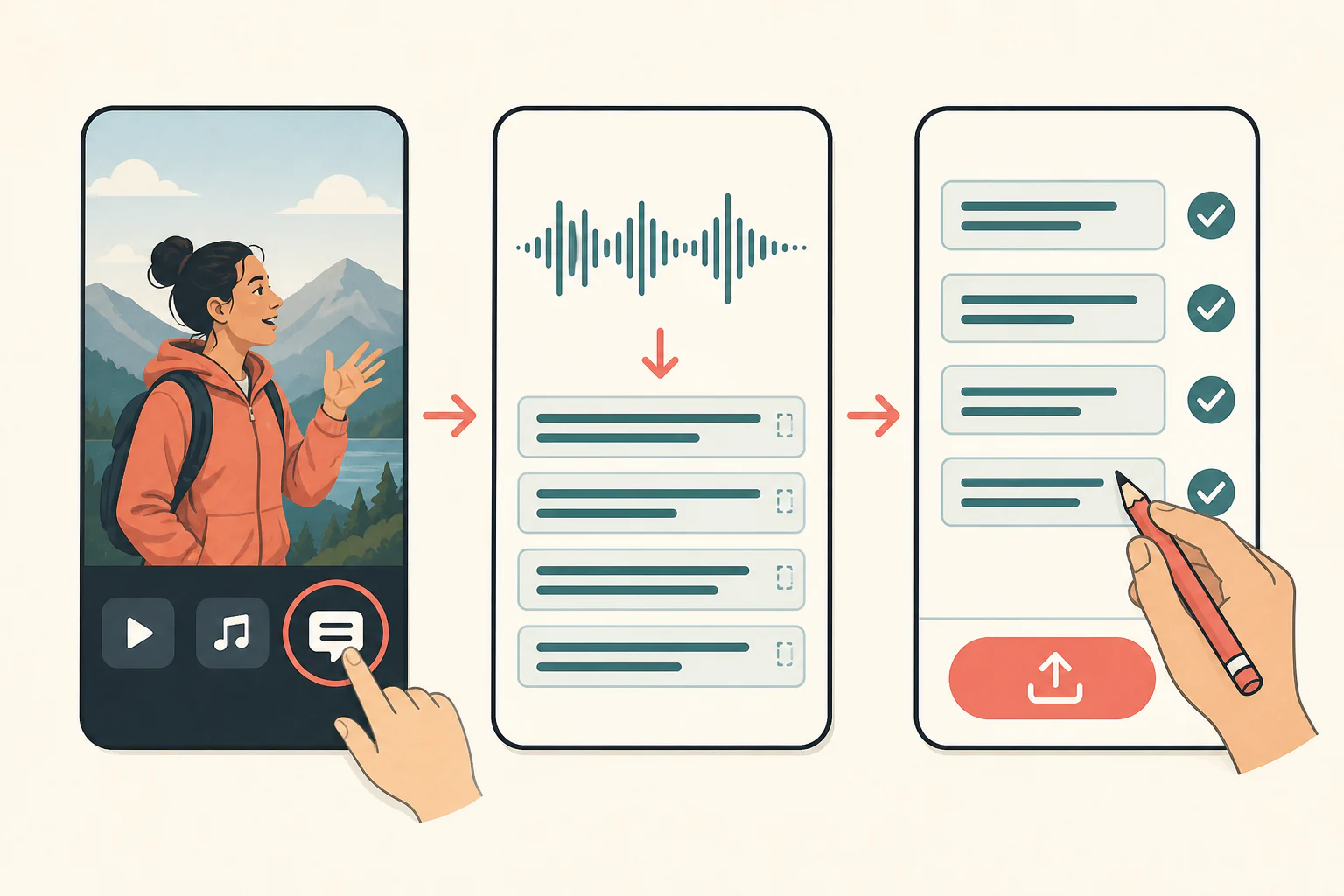
Use TikTok creator captions before posting
- Tap the plus button and record a video or upload one from your device.
- Continue to the preview screen and choose Captions from the side panel.
- Let TikTok process the spoken audio and create caption lines.
- Play from the beginning and correct spelling, punctuation, or wording.
- Save, preview the complete post, and publish after the text matches the audio.
Review names, product terms, numbers, and speech masked by music. Automatic transcription is a draft. Mute the preview once; if the story becomes confusing, a line or piece of context may be missing.
Set the language for auto-generated captions
TikTok also documents Select video language under More options before publishing. Choose the spoken language. If the label has moved or the control is unavailable, update the app and check TikTok's current accessibility help instead of relying on an old screenshot.
Official source: TikTok Help Center — Accessibility
How to edit TikTok captions after posting
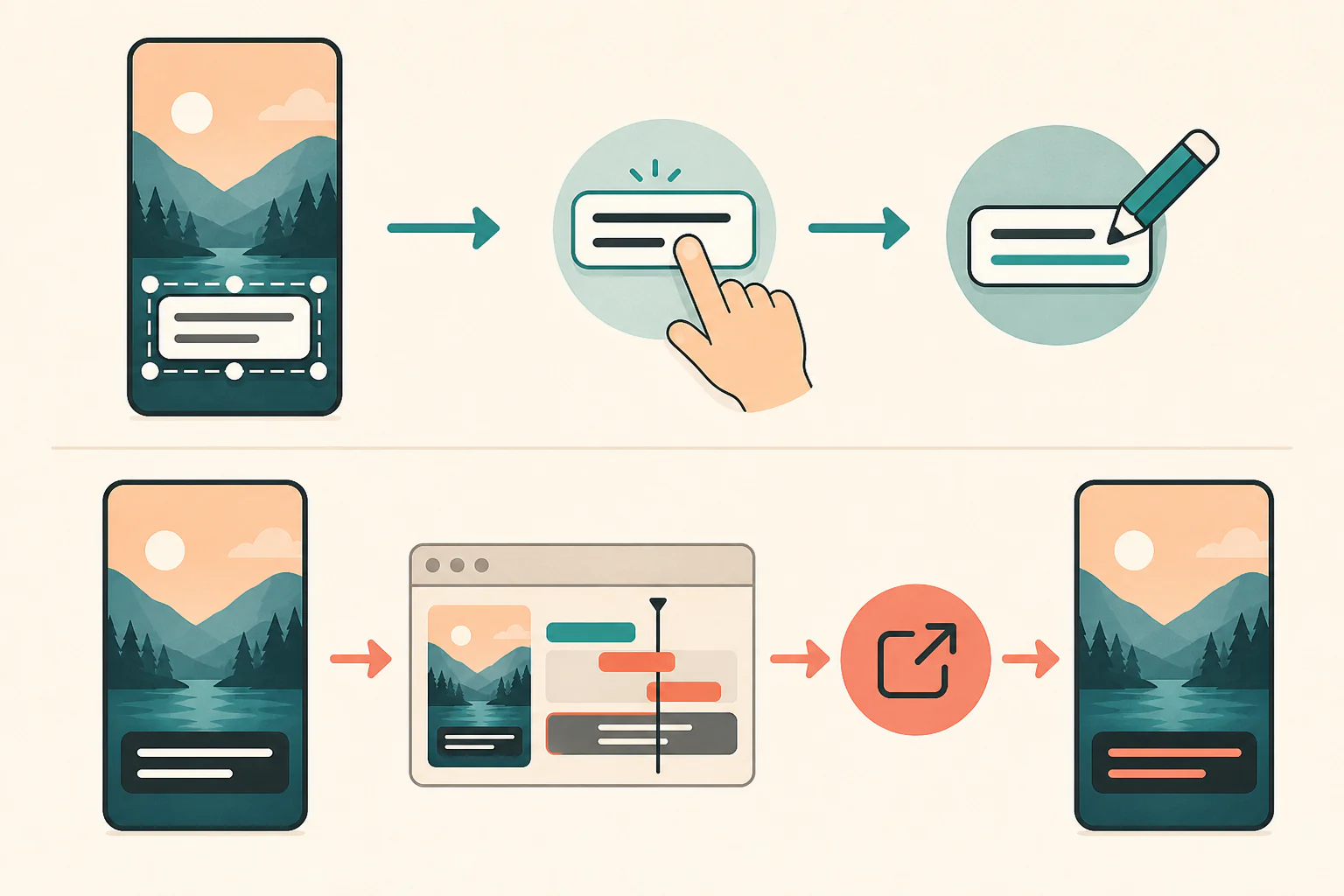
TikTok's current Help Center says you can edit or remove auto-generated captions on a published video. Open the video, tap the caption on the screen, choose Edit captions, make the correction or remove the captions, and save. The current page does not document the same after-posting path for creator captions.
That applies to TikTok's caption layer, not words rendered into the video pixels. To correct burned-in text, change the source project, export a new MP4, and upload a replacement. This page covers spoken-word subtitles, not the description below a TikTok post.
Official source: TikTok Help Center — Accessibility
How to add manual text on TikTok
Use TikTok's Text control for a title, hook, speaker label, or short correction. Enter the text, choose its font and color, place it clear of the subject, and watch the full preview.
Building continuous dialogue as separate manual text cards inside TikTok becomes tedious. For continuous speech, generate captions and edit the result instead of rebuilding a transcript one box at a time.
Official source: TikTok Help Center — Editing, posting, and deleting
How to add word-by-word captions before uploading to TikTok
Use this browser workflow when you want caption styling to remain part of the finished video.
1
Choose your local video
For a new project with no saved draft to restore, the TikTok preset opens a 9:16 canvas with the Hype style selected. You can change the canvas or style before export. Choosing the file does not connect a TikTok account or upload the original video to SubtitleGenerator.
2
Generate timed captions
Extracted audio becomes caption cues with word timing and confidence information. Wait for the complete result.
3
Review uncertain words
Listen around each flagged word and correct names, numbers, slang, and brand terms. Then replay from the beginning. Clearing flags does not make automatic transcription infallible.
4
Style, position, and export
Try Hype for word-pop motion or Karaoke for progressive emphasis. Keep important text inside the safe-area guide, check the first and last frames, and export a burned-in MP4.
Related link: Try the subtitle generator
Why word-by-word captions need word-level timing
A normal subtitle cue knows when a phrase begins and ends. A word-by-word effect also needs each word's timing so the renderer can highlight or reveal it with the speech.
Hype and Karaoke use that timing in the rendered video. They are visual treatments, not a setting stored in a standard SRT file. SRT carries caption text and time ranges; it does not carry the font, color, screen position, or per-word animation used in a burned-in export. If you need a separate native caption layer, use the destination platform's caption tools. If you need a fixed visual result, render the style into the video.
Related link: Closed captions vs open captions
Create TikTok style captions
TikTok style captions need to read quickly on a phone. Start with short lines, check contrast against the video, and keep words clear of the app controls. For a bold creator look, compare the MrBeast subtitle style. For phrase entrances, preview animated captions. The subtitle design guide explains type, contrast and safe-area checks before export.
How to keep captions clear of TikTok controls
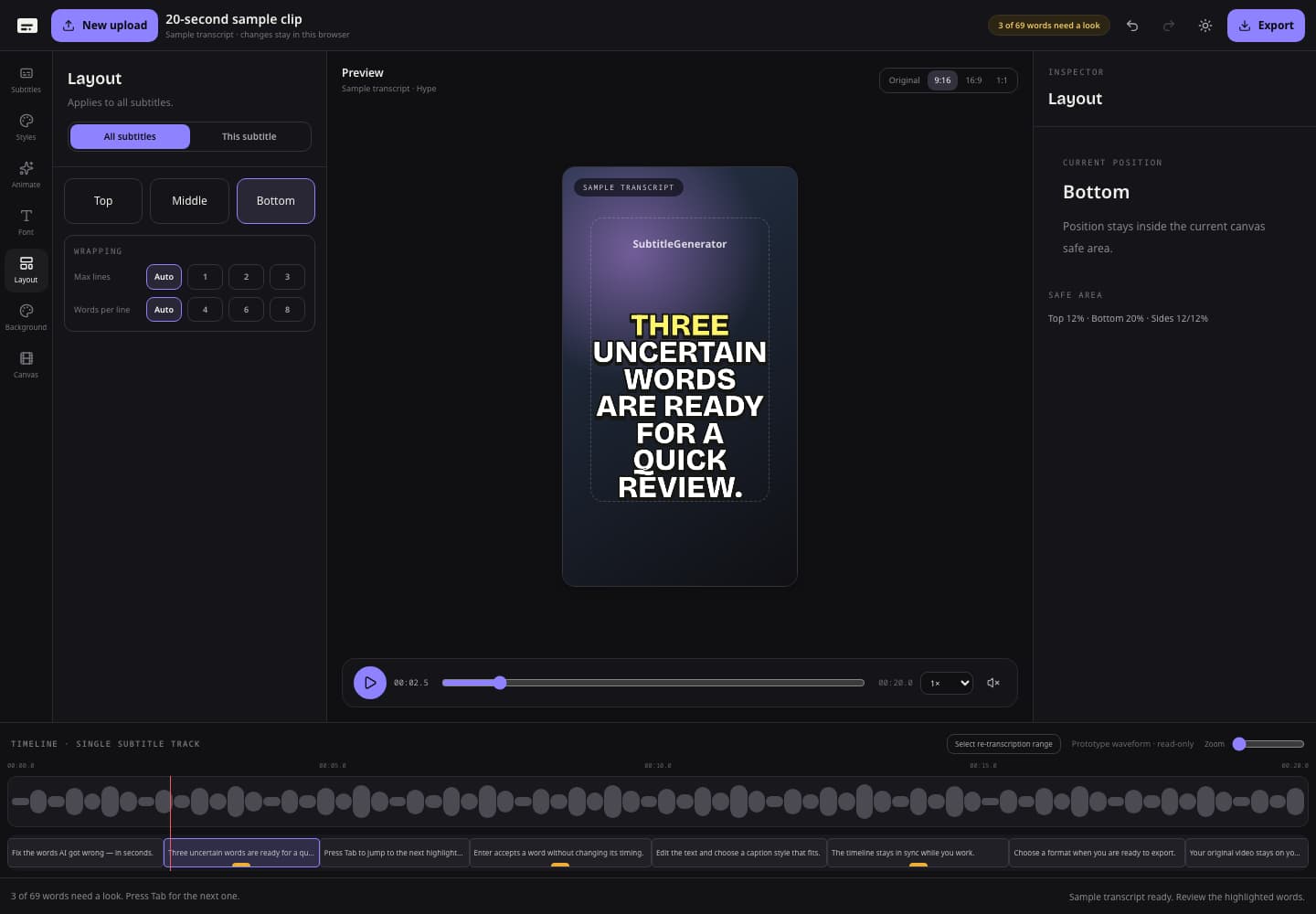
Start with a 9:16 canvas and keep faces, product details, and essential words away from the outer edges. SubtitleGenerator's safe-area guide is a placement aid, not a promise that every TikTok interface will cover the same pixels. Buttons, descriptions, translation prompts, device sizes, and app versions can change the visible area.
Before exporting, check for long lines, captions placed too low, and moments where the subject moves behind captions. Split a crowded cue instead of shrinking it. Then inspect TikTok's final preview; if controls overlap a word, move the captions and export again.
Can the same captioned video work for Reels and Shorts?
A 9:16 burned-in MP4 can be a starting point for TikTok, Instagram Reels, and YouTube Shorts. Their overlays, crops, and caption controls differ, so preview each upload and adjust when an interface covers important text.
Use each destination's native caption tools separately when viewers need a separate caption layer. For YouTube-specific choices between SRT and burned-in video, follow the YouTube captions workflow.
TikTok caption troubleshooting
TikTok does not show the Captions control
Update the app, confirm the video has audible speech, and look for Captions or the language setting in the current menus. TikTok's current Help page does not explain every missing-control case, so treat the cause as unknown and follow current in-app help rather than an old screenshot.
The automatic captions contain wrong words
Replay the surrounding sentence. Correct names, numbers, abbreviations, and punctuation. If music masks the voice, use cleaner source audio. In SubtitleGenerator, clear the uncertain-word review and perform one final watch.
The captions cover TikTok buttons or the description
Move captions higher, then check TikTok's final preview. A safe-area guide reduces risk but cannot predict every interface. Keep essential text away from the bottom and far-right edges.
The word-by-word highlight feels early or late
Play the sentence slowly and adjust the relevant word instead of shifting the whole video. Check the next cue too. Timing should follow speech, not a music beat, unless you intentionally edit it that way.
You found a mistake after publishing
Use Edit captions for TikTok's auto-generated layer. For text burned into the MP4, correct the source project and publish a new export.
Questions about adding captions on TikTok
How do I add captions on TikTok?
Before posting, add a video, open Captions, generate text, review every line, and save. Use manual Text for short callouts or a burned-in 9:16 export for word-by-word motion and repeatable styling.
Does TikTok add captions automatically?
Yes. TikTok supports auto-generated captions and creator captions. Select the spoken language where available and review names, jargon, and speech masked by music.
Can I edit TikTok captions after posting?
TikTok says auto-generated captions can be edited or removed after posting through Edit captions. Burned-in text requires a corrected project, new export, and replacement upload.
How do I make word-by-word captions for TikTok?
Generate word-level timing, correct the transcript, choose Hype or Karaoke, and export a burned-in video. Standard SRT does not carry per-word animation or styling.
Will my captions stay inside the TikTok safe area?
The 9:16 safe-area guide helps avoid risky edges, but cannot guarantee every TikTok overlay. Inspect the final upload preview and move important text when needed.
Can I reuse the video on Reels and YouTube Shorts?
Yes. A 9:16 burned-in MP4 is a practical starting point. Overlays and native caption controls differ, so preview each upload and adjust placement.
Is SubtitleGenerator free for TikTok captions?
Generating and editing are free. Free exports are up to 720p with a small watermark. Pro or Max enable watermark-free HD. PAYG adds time only.
Make a TikTok-ready captioned video
Choose a local video, review uncertain words, and export a styled 9:16 video to preview in TikTok.
Your original video stays on your device. Only extracted audio is processed for transcription.