SubtitleGenerator editorial
What is an SRT file? Format, example and how to use it
An SRT file stores timed subtitle text, not video. Read a working example, learn how to open it, and check common timing, encoding and playback problems.
What is an SRT file? It is a plain-text file that tells a video player which subtitle text to show and when to show it. SRT stands for SubRip, and the file normally ends in .srt. It contains timed text, not the video itself. You can inspect it in a text editor, then load it alongside the matching video in a compatible player.
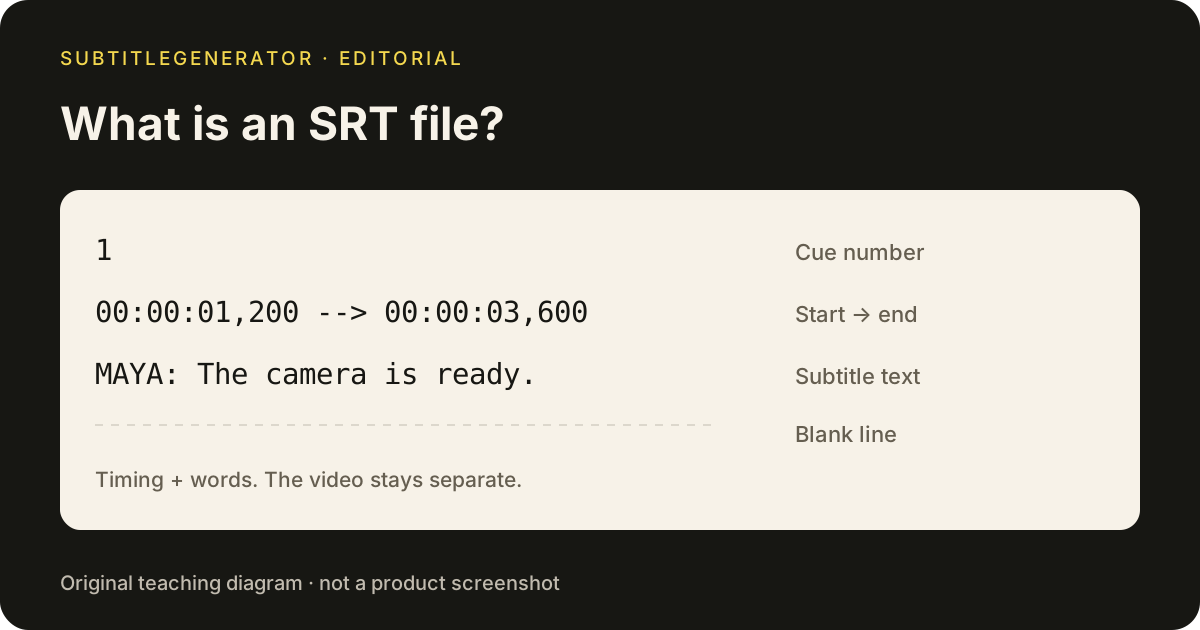
What an SRT file contains
An SRT file is organized into cue blocks. Each block has a sequence number, a start and end time, and one or more lines of text. A blank line separates it from the next block. The Library of Congress description of SubRip documents this basic structure and the format's plain-text nature.
Here is an original, valid SRT example you can save as interview.srt. It is a teaching sample, not an export from a customer recording:
1
00:00:01,200 --> 00:00:03,600
MAYA: The camera is ready.

2
00:00:04,000 --> 00:00:05,800
[door closes]

3
00:00:06,100 --> 00:00:08,400
JON: Let's begin the interview.
In this SRT file, cue 1 begins 1.2 seconds after the start and ends at 3.6 seconds. The time pattern is hours, minutes, seconds and milliseconds: HH:MM:SS,mmm. Use two hyphens and a greater-than sign between the times. The comma before milliseconds is part of the conventional SubRip syntax.
The sequence number is an index, not a frame count. Cue 3 does not have to begin at second 3. Its own timestamp determines when it appears. Keep that distinction in mind when you inspect an SRT file that starts well into a recording.
What an SRT file does not contain
An SRT file does not store the original sound or picture. It also does not reliably preserve a complete caption design. A style you see in an editing preview may not travel with the SRT file into another player.
Think of the SRT file as timing instructions and words. The receiving application decides how to display them. If you need the same font, color, position and animation to appear everywhere, a rendered video is a different deliverable. See closed captions vs open captions for the viewer-control trade-off.
An SRT file can carry speaker labels and sound descriptions, as the example shows. That makes it a possible container for reviewed SDH subtitles, but naming a file english-sdh.srt does not add those details. Likewise, a correctly formatted file can still contain wrong words or poorly timed lines.
How to open an SRT file
For inspection, use a plain-text editor. On a copy of the SRT file, check the first few cue blocks, confirm that accented names display correctly and make sure the extension has not silently become .srt.txt. Do not save it as a word-processing document with rich formatting.
For playback, open the matching video and use your player's subtitle-file control to select the SRT file. Some players can find a same-named file in the same folder; others require explicit selection. If nothing appears, confirm that the track is enabled and that the current playback time falls inside a cue.
For publishing an SRT file, use the platform's caption upload workflow. YouTube's supported caption-file documentation accepts basic SRT in plain UTF-8 and does not recognize its styling markup. That is a useful example of why an SRT file should be checked at its destination, not only in the application that created it.
Before sending an SRT file to a collaborator, include the language and the exact video version in your handoff. Two cuts can share the same opening but diverge later. A clear filename helps, but playback against the final cut is the real check.
How to make an SRT file from your video
When you have a video but no timed text, begin with SubtitleGenerator. Choose the local video, generate a draft, correct uncertain words and review cue boundaries. The original video stays in your browser; extracted audio is processed for transcription.
Download the SRT file after reviewing the draft. SRT and VTT downloads require Pro or Max. Free exports a 720p video with a small watermark. PAYG adds processing time without unlocking subtitle-file downloads by itself. The subtitle tools overview explains the available workflows before you choose an output.
Keep the exported SRT file with the exact version of the video you reviewed. Upload the pair to the destination, enable the caption track and replay the opening, a middle section and the ending. Then check every difficult passage you flagged during editing. A file download confirms delivery of bytes, not the accuracy of the finished track.
If you already have an SRT file and only need another subtitle format, use a file operation instead of transcribing the video again. TimedSubs SRT to VTT handles that conversion. Renaming the extension alone does not rewrite the syntax. Use SubtitleGenerator when you start from a video; use TimedSubs when you already have timed text.
Troubleshooting an SRT file
Start with the symptom before changing the text. Work on a copy so you can compare the result against the original SRT file.
| Symptom | First check | Why it helps |
|---|---|---|
| Nothing appears | Enabled track, matching video and cue times | A loaded file can still be outside its display interval |
| Accented characters look wrong | Text encoding and destination requirements | The same bytes can be decoded differently |
| Every cue is equally late | A consistent timing offset | This suggests a different start point |
| Captions drift further out of sync | Exact cut and timeline length | A fixed shift may not repair a version mismatch |
| One passage disappears | Block boundaries and start/end order | A malformed or empty cue can be handled differently by readers |
| Styling disappears | Supported destination markup | Plain SRT is not a portable animation format |
Do not fix gradual drift by repeatedly nudging random lines. First establish whether the SRT file belongs to a different edit. If the source video has a new introduction or a removed section, the timing needs to follow that change.
For a final SRT review, read the words at normal speed while watching the picture. Check that lines begin with the speech, do not flash too briefly and do not linger over a later speaker. For what belongs in a complete caption track, continue with what is closed captioning. To inspect the existing editor without processing a video, open the built-in sample.
Frequently asked questions
What is an SRT file?
An SRT file is a plain-text SubRip subtitle file. It stores numbered cues containing start and end timestamps and the text to display. It does not contain the video, audio or a complete visual design.
How do I open an SRT file?
Open an SRT file in a plain-text editor to inspect its contents. To watch it with a video, load the matching file through a compatible player's subtitle controls or upload it through the destination platform's caption workflow.
Is an SRT file the same as a video?
No. An SRT file carries timing and text. You need the matching video separately. Renaming an SRT file to MP4 does not turn it into a video or burn the words into the picture.
Can an SRT file include SDH subtitles?
Yes. An SRT file can contain dialogue, speaker names and meaningful sound descriptions. The extension does not prove that these details are present or accurate; review the contents and the receiving platform's requirements.
Can I download an SRT file for free from SubtitleGenerator?
SubtitleGenerator lets you generate and edit a draft within Free limits, but downloading an SRT file requires Pro or Max. Free export is a 720p video with a small watermark. PAYG adds processing time and does not unlock subtitle-file downloads by itself.
Put the workflow on a video
Inspect a local file or open the built-in sample to preview caption styles and export formats. Your video stays on your device.
Upload your video