SubtitleGenerator editorial
SDH subtitles: meaning, examples and when to use them
Learn what SDH subtitles include, how they differ from dialogue-only subtitles and CC, and how to review speakers, sounds and timing before publishing.
SDH subtitles are subtitles for the deaf and hard of hearing. Alongside dialogue, they communicate audio details that matter to the scene: an unseen speaker, a phone vibrating or music that changes the mood. SDH can be in the same language as the soundtrack or translated. The defining question is what a viewer can understand without hearing, not which language the text uses.
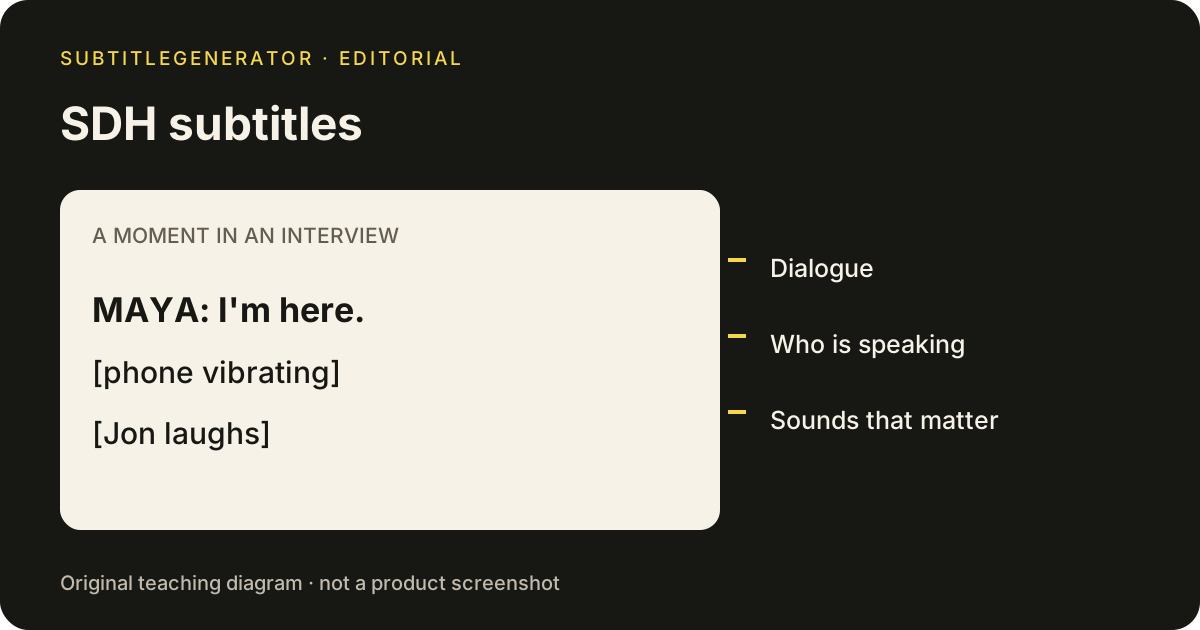
What SDH subtitles add to dialogue
Imagine a short interview. The camera stays on an empty chair while someone says, “I'm here.” A phone vibrates, and the person behind the camera laughs. A dialogue-only track could show just those two spoken words. An SDH track needs enough information to explain who spoke and why the moment changed.
The examples here are original teaching examples, not transcripts from a customer video. Compare three possible lines:
| What happens | Dialogue-only text | SDH example |
|---|---|---|
| A named speaker talks off camera | I'm here. | MAYA: I'm here. |
| A vibrating phone interrupts the scene | No text | [phone vibrating] |
| Someone laughs off camera | No text | [Jon laughs] |
SDH editing is a judgment task. Do not fill every pause with a label. Keep information that helps the viewer follow the scene, and avoid naming an unseen person before the story reveals them. The DCMP sound and music guidance is a useful reference for deciding which non-speech events to represent.
SDH vs subtitles vs closed captions
These labels overlap, so use them as a starting point rather than a guarantee about a particular file.
| Track label | What to look for | What the label does not prove |
|---|---|---|
| Subtitles | Dialogue in the selected language | That every speaker and sound is represented |
| SDH subtitles | Dialogue plus relevant audio information | That the track is translated or perfectly reviewed |
| Closed captions / CC | A selectable caption track | That automatic text has been checked |
SDH vs CC is often a question about the platform's naming and delivery conventions. A selectable SDH track can serve a similar purpose to closed captions. Neither term guarantees a particular font, background color or file extension. For the delivery mechanism itself, read what closed captioning means and the open vs closed caption comparison.
For the audience decision in more depth, compare closed captions vs subtitles.
An SDH label also does not mean “subtitles with audio description.” Audio description explains important visual information through audio; SDH communicates relevant audio information through text. They address different information gaps.
When to choose SDH subtitles
For a viewer, English SDH is a useful option when dialogue alone leaves questions unanswered. It can explain an offscreen crash, distinguish voices during a cutaway or identify a song that matters to a scene. You may prefer it when watching without sound even if you can hear the soundtrack in other situations.
For a creator, choose an SDH workflow when your audience needs the audio story in text. Decide that before editing: retrofitting sound information into tightly packed dialogue takes another timing pass. Check the receiving platform's requirements and ask for audience feedback where possible. A file extension or an SDH badge cannot establish that the result is usable.
Do not assume that every language option includes SDH. Select the available track and inspect an actual scene with sound information. If a platform offers both English and English SDH, compare the same moment rather than judging from the menu alone.
How to review an SDH draft
A useful SDH review has several passes, each with a concrete question.
- Dialogue: Are the words correct? Check names, numbers and negations before adding extra labels. Keep a list of uncertain phrases to replay.
- Speakers: Can the viewer tell who is talking? In an SDH draft, identify ambiguous voices consistently, without guessing a person's name from the audio.
- Sounds: What would be missed with the audio muted? Add concise descriptions for meaningful events, including sound-only moments between spoken lines.
- Timing: Does each SDH cue appear when the event happens? Do not display a reaction before the event that causes it.
- Reading: Is there time to read the complete line? Test ordinary playback, not only a paused editor preview.
- Delivery: Does the exported SDH track still carry the intended text, and can the receiving player load it?
For a concrete editorial convention, the Netflix English timed-text style guide has an SDH section covering speaker identification, sounds and music. Those are Netflix delivery rules, not a universal certification or a promise about this product. Use the specification required by your own destination.
Preparing SDH subtitles in SubtitleGenerator
Start from your video in SubtitleGenerator, generate a timed speech draft, then correct the text and cue timing. Your original video stays in the browser; extracted audio is processed for transcription. SDH review remains your responsibility: automatic speech recognition does not establish that all meaningful sounds have been represented.
Use the existing cue editor to revise lines and add missing cues in gaps. Review speaker assignments rather than assuming every automatic label is correct. Before calling the result SDH, replay the video with attention to audio events that did not contain speech. A quiet interval in the transcription can still contain information the audience needs.
For a selectable SDH track, export the reviewed text as SRT or VTT with Pro or Max and load it into a compatible player. Free exports a 720p video with a small watermark; it does not include subtitle-file downloads. Burning the same reviewed words into a video makes them permanently visible, so choose that delivery intentionally.
The caption styles page helps you compare appearance for a burned-in version. It does not change the information required for SDH. For file structure and timing examples, read what is an SRT file. You can also open the sample editor to inspect the workflow before choosing a local video.
Frequently asked questions
What does SDH mean in subtitles?
SDH means subtitles for the deaf and hard of hearing. SDH subtitles represent dialogue plus relevant speaker and sound information, so understanding the scene does not depend on hearing its soundtrack.
Are SDH subtitles always translated?
No. SDH subtitles can use the same language as the audio or a different language. SDH describes the information included for the audience, not whether a translation has happened.
What is the difference between SDH subtitles and CC?
SDH and CC can carry similar accessible content. SDH describes a subtitle track with relevant audio information; closed captions describe a caption delivery that viewers can switch on or off. Platform labels and supported formats vary.
Should I choose English or English SDH subtitles?
Choose English SDH when you want speaker and sound information as well as dialogue. A track labeled only English may contain dialogue without those details. Preview the available tracks because labels alone do not establish their quality.
Can automatic subtitles produce a finished SDH track?
Treat automatic subtitles as a draft for SDH review. Check the words and timing, add meaningful sounds and verify speaker labels. SubtitleGenerator supports draft editing; SRT and VTT downloads require Pro or Max, while Free exports a 720p video with a small watermark.
Put the workflow on a video
Inspect a local file or open the built-in sample to preview caption styles and export formats. Your video stays on your device.
Upload your video