YouTube captions · Updated August 2026
How to add captions to YouTube videos: 5 methods
In YouTube Studio, select Subtitles, choose the video and language, then upload a timed file, use Auto-sync, type manually, or review YouTube's automatic track. Add styled captions before upload when they must stay visible on a Short.
Use the subtitle generator to prepare a reviewed file before upload: choose a local video, generate timed captions, review uncertain words, then export an SRT or styled MP4. The original stays in your browser; only extracted audio is processed for transcription.
Your original video stays in your browser. Generate and edit free. SRT and HD no-watermark exports require Pro or Max.
Real SubtitleGenerator export
One burned-in result for Shorts; choose SRT when viewers need switchable captions.
Last checked against YouTube Help: August 20, 2026.
Five ways to add captions to a YouTube video
The best method depends on whether the video is already uploaded, whether viewers should be able to turn the captions off, and whether the text design needs to stay fixed.
| Method | Best for | What viewers get | Main tradeoff |
|---|---|---|---|
| Review YouTube automatic captions | A video that is already uploaded with clear speech | A switchable caption track | The draft may be delayed or wrong and still needs review |
| Upload a timed SRT | Reviewed text and timing prepared before YouTube | A switchable caption track | Basic SRT does not carry your font, color, position, or animation |
| Auto-sync a transcript | A complete transcript without timecodes | A switchable caption track after YouTube processes the timing | The transcript must match the spoken language and audio closely |
| Type manually | A very short clip or a few missing lines | A switchable caption track | Slow for a full spoken video |
| Burn captions into the MP4 | Shorts, word-by-word motion, or a fixed visual style | Text that is always visible | Viewers cannot turn it off, and corrections require a new export |
Choose automatic captions for an uploaded video, SRT for a reviewed reusable file, and burned-in captions when the design is part of the edit. Auto-sync and manual typing fill the narrower transcript-only and short-clip cases.
For a platform-neutral workflow, see how to add captions to a video before choosing where the finished captions will be published.
How to add captions in YouTube Studio
The shared starting point for a switchable caption track is YouTube Studio:
- Sign in to YouTube Studio.
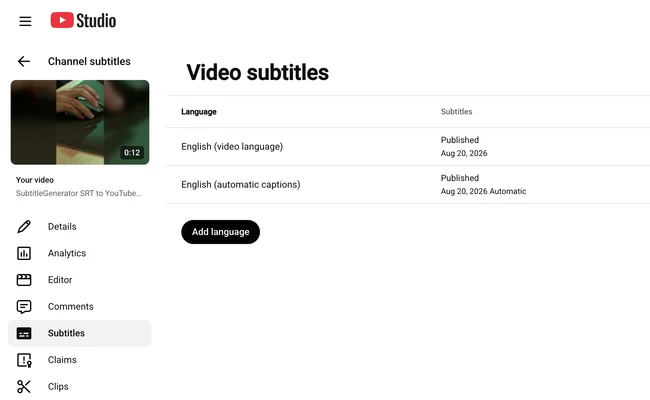
- Select Subtitles from the left menu.
- Choose the video you want to caption.
- Select ADD LANGUAGE and choose the language spoken in the video.
- Under Subtitles, select ADD.
- Choose Upload file, Auto-sync, or Type manually, then review the result before you save or publish it.
You can also add captions during upload. Edit an existing automatic track instead of creating a duplicate, and consult current YouTube Help if a control has moved.
Source link: YouTube Help — Add subtitles & captions
How to upload an SRT file to YouTube
An SRT stores caption lines and their time ranges. Use it when you want reviewed timing that can be reused outside YouTube.
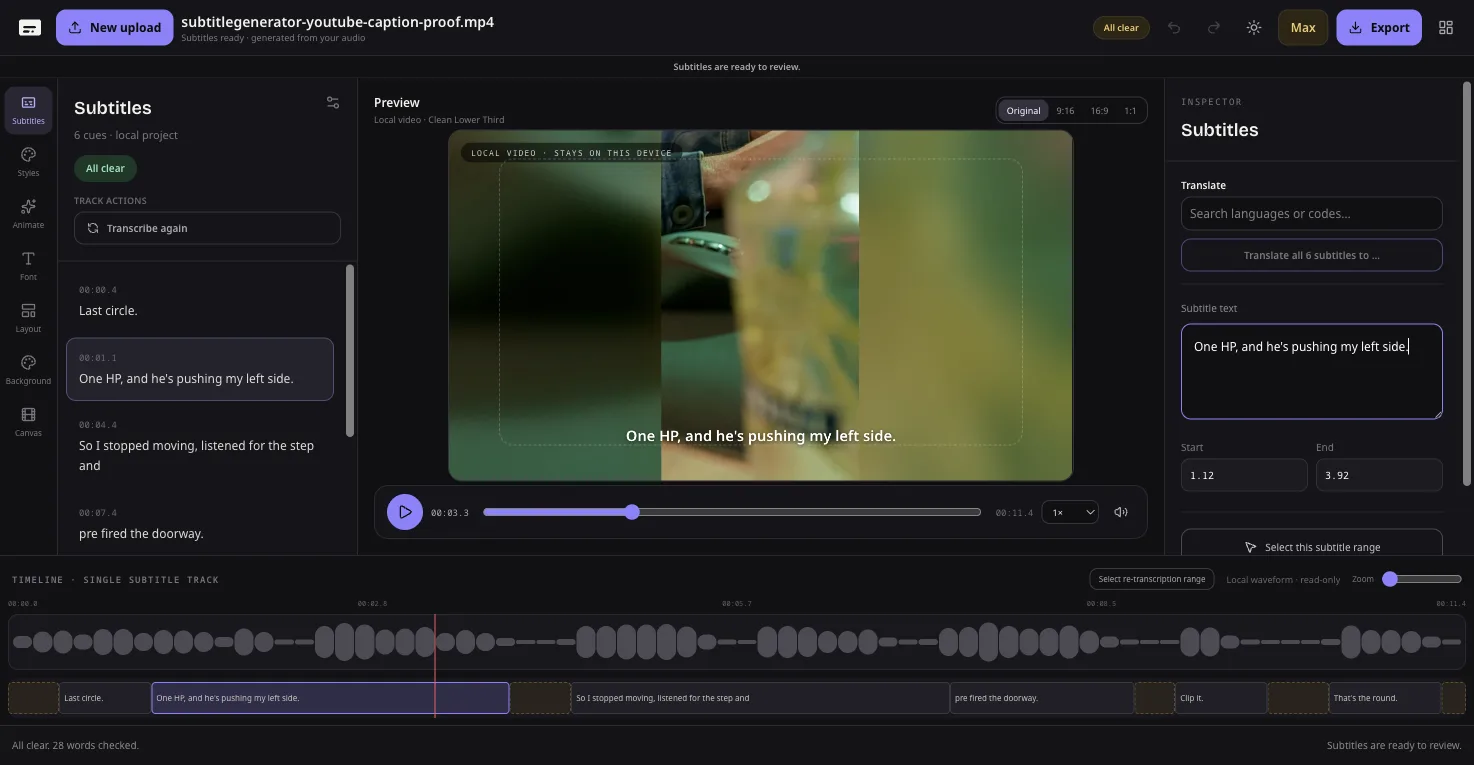
- In SubtitleGenerator, choose the final edited video and generate captions.
- Correct names, numbers, terms, punctuation, and uncertain words, then replay the video once.
- Export SRT. Downloadable subtitle files require Pro or Max.
- In YouTube Studio, open Subtitles, select the video and language, and select ADD.
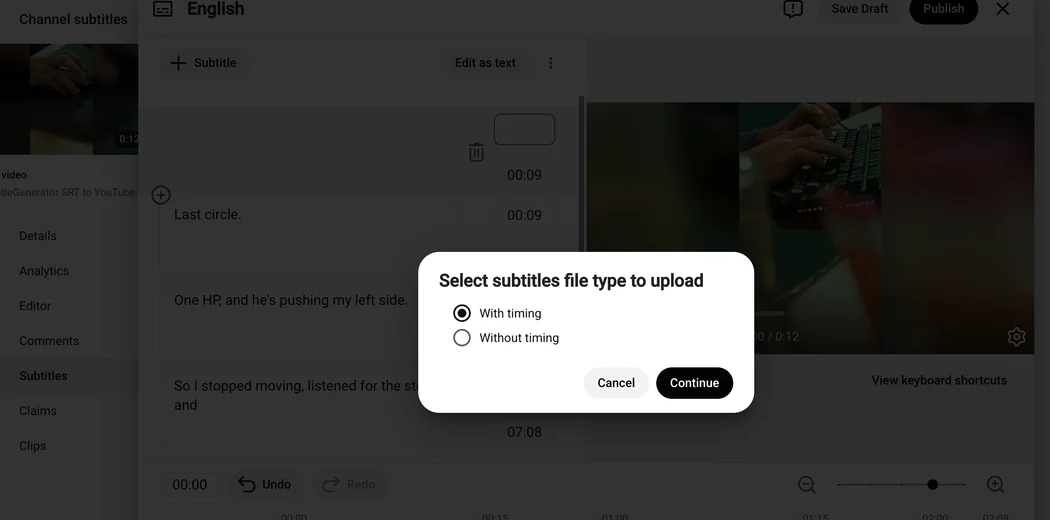
- Choose Upload file, select With timing, and continue.
- Choose the SRT, inspect the imported lines and timing, then select Save.
Use the final cut. A new intro, removed pause, or later trim can shift every following timecode, so regenerate or retime the file after the edit changes.
YouTube accepts basic SubRip files as plain UTF-8 but does not recognize their style markup. SubtitleGenerator fonts, colors, positions, backgrounds, and word animations do not travel in SRT. Burn them into the video when the design must stay fixed.
Source link: YouTube Help — Supported subtitle and closed caption files
How to review YouTube automatic captions
YouTube can publish automatic captions for supported long-form videos and Shorts. They may be delayed or misread accents, names, fast speech, and words masked by noise.
In YouTube Studio, open Subtitles and the video, then open the automatic row with Edit or More. Choose Duplicate and edit when prompted, correct text or timestamps, and Publish after the track matches the audio.
If they do not appear, wait for processing and confirm the language. YouTube also lists long videos, poor audio, silent openings, overlapping speakers, and simultaneous languages as possible causes. A CC button is not proof the words are correct.
Use the native path for an uploaded video with a usable draft. Use reviewed SRT when you want corrections before upload or the same reviewed file in another editor.
Source link: YouTube Help — Use automatic captioning
Source link: YouTube Help — Edit or remove captions
Closed captions or burned-in captions for YouTube Shorts?
A switchable caption track and burned-in text are not the same output.
Use a caption track when viewers need control
Upload an SRT or use YouTube's tools when viewers should control the caption display. A separate track can also be edited without replacing the video.
Use burned-in captions when the design is part of the Short
Burned-in captions are pixels in the MP4, so fonts, positions, backgrounds, and word-timed motion stay visible. The YouTube Short option starts a 9:16 Hype project, and both canvas and style remain editable.
Viewers cannot hide burned-in words, and corrections require a new export. Keep essential text away from the edges and inspect YouTube's final mobile preview for controls and crops.
Adding a native track to burned-in text can show two caption layers when CC is on. Test both states; a 9:16 frame alone does not guarantee safe placement.
Related link: Closed captions vs open captions
Fix common YouTube caption problems
Automatic captions are missing
Wait for processing, confirm the language, and check for silence, unclear audio, overlapping speakers, or mixed languages. For a fixed publishing time, prepare an SRT instead of relying on unknown processing.
YouTube rejects the SRT
Use a basic .srt in plain UTF-8 without CSS, ASS tags, or other styling. Re-export damaged numbering or timecodes, and choose With timing for a timed file.
The imported captions are out of sync
Match the SRT to the uploaded final cut. Intros, removed pauses, speed changes, and inserted clips shift later timecodes. Regenerate or retime, then check the beginning, middle, and end.
The caption style disappeared
Basic SRT does not preserve SubtitleGenerator styling. Export a burned-in MP4 when font, color, background, position, or word animation must stay fixed.
Captions exist but viewers cannot see them
Confirm the correct language track is published, then test the permitted video with CC on. For burned-in text plus a native track, test CC both on and off for overlap.
YouTube caption quality checklist
Before publishing, check the result as a viewer:
- Correct names, numbers, brands, abbreviations, and specialist terms.
- Make each line appear with the speech and leave enough time to read it.
- Split crowded lines at a natural phrase instead of shrinking the text.
- Add useful non-speech information such as [music] or [applause] when it affects meaning.
- Set the spoken language correctly and do not mix two languages into one automatic track.
- Preview faces, products, and captions together on a phone-sized screen.
- Test the final YouTube video with CC on and off, including the first and last caption.
Accurate captions help deaf or hard-of-hearing viewers and people watching without usable audio. They do not come with a promise of better rankings or recommendations.
Questions about adding captions to YouTube videos
Can YouTube add captions automatically?
Yes, for supported long-form videos and Shorts. The track may be delayed or wrong, so review names, accents, jargon, punctuation, and timing in YouTube Studio.
Can I upload my own captions to YouTube?
Yes. In YouTube Studio, choose Subtitles, the video and language, then ADD → Upload file. Choose With timing for a timed SRT and review it before saving.
How do I add captions to a YouTube video on mobile?
YouTube Create can caption clips up to 60 seconds on supported devices. Use YouTube Studio for a switchable SRT track and verify current mobile support.
Can I add captions to a YouTube video that is not mine?
Not as an ordinary viewer. A channel owner or manager can invite a trusted person as a Subtitle Editor. That role is not available for Brand Accounts, and the video's language must be set before the editor can add or change captions.
Should I upload an SRT or burn the captions in?
Upload an SRT for a switchable, separately editable track. Burn captions into the MP4 for fixed styling or word-timed motion; viewers cannot hide burned-in text.
Is SubtitleGenerator free for YouTube captions?
Generate and edit free. Free video exports are 720p with a small watermark. Subtitle files and HD no-watermark exports require Pro or Max. PAYG adds time only.
Do captions improve YouTube rankings?
No ranking result is promised. Add accurate captions for accessibility, viewer control, and clarity—not an unsupported claim that SRT or burned-in text improves search position or recommendations.
Add reviewed captions to your YouTube video
Choose a standard video or a Short, review the words that need attention, and export the format that matches how viewers should see the captions.
Your original video stays in your browser. Only extracted audio is processed for transcription.