Burn subtitles
Burn Subtitles into Video and Add SRT to MP4
Burn subtitles into video without installing software. Choose your video, add your SRT or VTT file, fix any line, pick a style, then export an MP4 with hardcoded subtitles. Burning an imported subtitle file requires Pro or Max.
Free lets you check your SRT and preview its first three subtitles. Importing uses no subtitle time and starts no transcription. Pro and Max export burned-in subtitles in HD with no watermark.
Your video and subtitle file stay on this device. The file is read in your browser, and the SRT to MP4 render happens there too.
Import uses no subtitle time · Pro or Max to burn in
No subtitle file?
How to burn subtitles into video in three steps
Choose your video
Start with the final cut on this device. You can add SRT to MP4, MOV, WebM or MKV video. The editor checks the video length and file size against your plan before you continue.
Add SRT to video
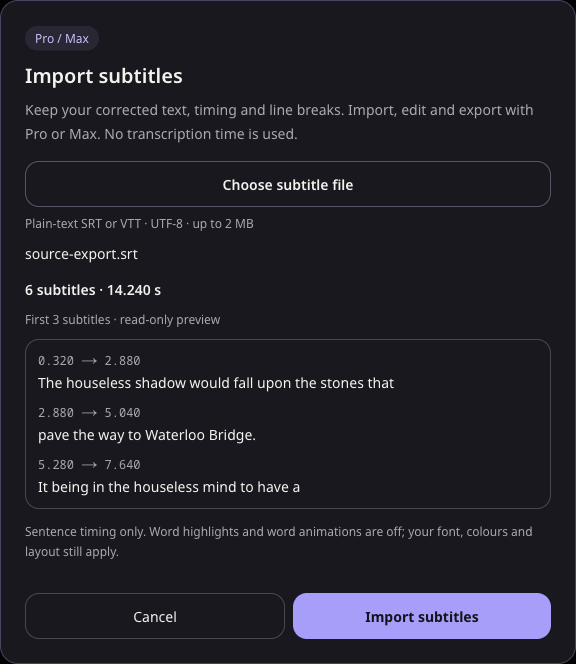
Import a plain-text SRT or VTT file in UTF-8, up to 2 MB. Before anything is replaced, you see the number of subtitles, the last timestamp and a read-only preview of the first three lines.
Style and burn subtitles into the MP4
Pick a caption style, adjust the font, colors and position, then play the result. Export the MP4 to hardcode subtitles into every frame. With Pro or Max, the burned-in subtitles export in HD with no watermark.
Burned-in subtitles or a separate SRT file?
Burned-in subtitles, also called hardcoded subtitles or open captions, are drawn into the picture. They show on every player and platform, keep your font and colors exactly, and cannot be turned off. Hardcode subtitles for social clips, videos that autoplay with the sound off, and files you send to people who may not load a caption track.
A separate SRT stays switchable. Viewers can turn it off, and the player decides how it looks. Use one when a platform asks for a caption file or when viewers need to choose a language. You can export both from the same project: an MP4 with burned-in subtitles and the SRT file.
Fix the SRT before you burn subtitles in
Once you burn subtitles in, a typo stays in every copy of the video. Before you export, correct any line in the editor, change when a subtitle starts or ends, and use find and replace for names that appear many times. Run the readability check on the whole track to see subtitles that are on screen for less than a second, read too fast in Latin-script text, or run past two lines.
Imported files keep your exact text, line breaks and millisecond timing. If you replace an existing draft by mistake, undo restores it.
Style hardcoded subtitles
Choose from 33 caption styles for your hardcoded subtitles, then change the font, colors, background and position to fit the video. Pro and Max can upload custom fonts and save a brand style to reuse on the next video in this browser.
Imported subtitles use sentence timing, so each subtitle appears as a whole line. Word-by-word highlighting needs word timing; to get it, generate the subtitles from the video instead of importing a file.
Can you burn subtitles into video for free?
Not with an imported file. Free lets you check an SRT or VTT and preview its first three subtitles, but to add SRT to video and export it you need Pro or Max.
| Free | Pro | Max | |
|---|---|---|---|
| Price | $0 | $9/month or $90/year | $15/month or $150/year |
| Check an SRT or VTT and preview 3 subtitles | Yes | Yes | Yes |
| Import, edit and burn subtitles into video | — | Yes | Yes |
| Video export | 720p with a small watermark | HD, no watermark | HD, no watermark |
| Video length | 10 min | 30 min | 60 min |
| File size per video | 512 MB | 1.5 GB | 3 GB |
There is a free route if you do not have a subtitle file yet: generate subtitles from the video, correct them, and export a 720p video with burned-in subtitles and a small watermark. PAYG adds subtitle time only; it does not unlock importing or HD export.
See a real SRT to MP4 burn-in
This clip is a 7-second excerpt of an MP4 exported from SubtitleGenerator on October 27, 2026 (UTC) after importing a 6-line SRT and applying Clean Lower Third. The SRT came from an earlier SubtitleGenerator project and was not edited before import; the excerpt was trimmed and compressed for the web with no other changes.
Footage: Erik Mclean on Pexels · Narration: Mark Leder, LibriVox (public domain)
Fix common problems before you add SRT to MP4
Strange characters. Save the file as UTF-8 and import it again. Other encodings are rejected rather than guessed.
Subtitles that run past the video. The file is rejected if a subtitle ends after the video does. Check that the SRT belongs to this cut, not an earlier edit.
Overlapping or out-of-order times. Each subtitle must end before the next one starts. The error names the subtitle number so you can fix it in a text editor.
Styling inside the file. Formatting tags, VTT style blocks and positioning settings are not accepted. Remove them, then style the subtitles in the editor.
Very large files. One file can hold up to 5,000 subtitles and 2 MB.
What this burn subtitles tool does not do
It can burn subtitles into video you choose. It does not remove hardcoded subtitles that are already in a video, extract a subtitle track that is already inside an MP4 or MKV, or add a switchable subtitle track to the MP4 container. It does not change Plex, Jellyfin or media-server playback settings.
No SRT yet? Generate and burn subtitles in one editor
Generate subtitles from the video, review every word, then export them in the same editor. Need only the file? Convert MP4 to SRT.
FAQ
How do I burn subtitles into a video?
Choose your video above, add your SRT or VTT file, check the preview, pick a style, then export the MP4. Burning an imported subtitle file requires Pro or Max.
How do I add SRT to MP4 permanently?
Import the SRT into the editor and burn subtitles into a new MP4. The subtitles become part of the picture, so they show on every player and cannot be turned off.
What is the difference between hardcoded subtitles and soft subtitles?
Hardcoded subtitles are drawn into the video frames. Soft subtitles are a separate track or file, such as SRT, that viewers can turn on or off.
Can I hardcode subtitles for free?
Not from an imported file; Free can check the file and preview three subtitles. If you generate subtitles from the video instead, Free exports a 720p video with burned-in subtitles and a small watermark.
Is my video uploaded when I burn subtitles in?
No. The subtitle file is read in your browser and the MP4 is rendered there. Importing a file starts no transcription and uses no subtitle time.
Can I edit the SRT before I burn subtitles into video?
Yes. Correct the text, change start and end times, and use find and replace across the whole track before you export.
Why does my SRT show strange characters?
The file is probably not UTF-8. Save it as UTF-8 in a text editor and import it again.
Will burned-in subtitles keep word-by-word animation?
Imported subtitles appear one whole line at a time. For word-by-word highlighting, generate the subtitles from the video so each word has its own timing.